
blushbreastscleavageclosegray_hairheadbandkozeni_isarilong_hairno_brawhite.jpg.38d7ceaafa61e28f6bc0f5f47d770b91.jpg)

Majster87
-
Postów
648 -
Dołączył
-
Ostatnia wizyta
-
Wygrane w rankingu
3
Typ zawartości
Profile
Forum
Pliki
Galeria
Blogi
Sklep
Wydarzenia
Treść opublikowana przez Majster87
- Poprzednia
- 1
- 2
- 3
- 4
- 5
- 6
- 7
- Dalej
- Strona 2 z 25
-

Ustawienie od najwiekszei do najmniejszej oceny w widget
Majster87 opublikował(a) temat w Ogólny support IPS4
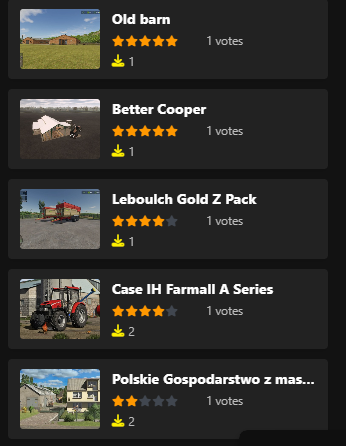
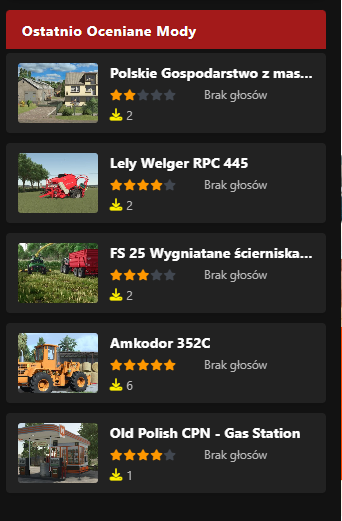
jak ustawic w tym kodzie: <h3 class="mod-widget__title">Ostatnio Oceniane Mody</h3> {{if !empty( $comments ) }} <ul class="mod-widget-list"> {{foreach $comments as $comment}} <li class="mod-widget-item"> <div class="mod-widget-thumb"> {{if $comment->item()->primary_screenshot_thumb}} <img src="{file="$comment->item()->primary_screenshot_thumb->url"}" alt="{$comment->item()->name}"> {{else}} <img src="{resource="default_mod_thumb.png" app="core"}" alt="Brak miniatury"> {{endif}} </div> <div class="mod-widget-info"> <div class="mod-widget-title"> <a href="{$comment->url()}">{$comment->item()->name}</a> </div> <div class="mod-widget-rating"> {template="rating" group="global" location="front" app="core" params="'small', $comment->rating, \IPS\Settings::i()->reviews_rating_out_of"} <span class="mod-widget-votes"> {{if $comment->item()->reviews > 0}} {$comment->item()->reviews} {{if $comment->item()->reviews == 1}}głos{{else}}głosów{{endif}} {{else}} Brak głosów {{endif}} </span> </div> <div class="mod-widget-downloads"> <i class="fa fa-download"></i> {$comment->item()->downloads} </div> </div> </li> {{endforeach}} </ul> {{endif}} żeby sortowało od największej do najmniejszej ocenionej a nie od ostatniej ocenionej? w ustawieniach widgetu nie ma takiej opcji a edytowany jest orginalny widget Pliki - Opinie o plikach -
Jak sie da tak, bo teraz pokazuje od ostatniej oceny a chce zeby pokazywalo najwiecej ocenionych czyli na 1 z najwieksza ocena potem jak naprzyklad na pierwszym ma 500 ocen a nastepna 499 to zeby była pod spodem i tak dalej

-
z bazy danych review_votes ale widzę ze błąd robiłem a byłem blisko wczoraj tego xD Działa. A wiesz jak zrobić w tym żeby nie pokazywało ostatnich ocenionych tylko najwięcej ocenionych malejąco (czyli najwięcej razy oceniona jako pierwsza i poniżej malejąco)? Bo w ustawieniach przy dodaniu tego widgetu nie ma takiej opcji 😕
-
przerobiłem sobie cały ten blok i teraz kod wyglada tak <h3 class="mod-widget__title">Ostatnio Oceniane Mody</h3> {{if !empty( $comments ) }} <ul class="mod-widget-list"> {{foreach $comments as $comment}} <li class="mod-widget-item"> <div class="mod-widget-thumb"> {{if $comment->item()->primary_screenshot_thumb}} <img src="{file="$comment->item()->primary_screenshot_thumb->url"}" alt="{$comment->item()->name}"> {{else}} <img src="{resource="default_mod_thumb.png" app="core"}" alt="Brak miniatury"> {{endif}} </div> <div class="mod-widget-info"> <div class="mod-widget-title"> <a href="{$comment->url()}">{$comment->item()->name}</a> </div> <div class="mod-widget-rating"> {template="rating" group="global" location="front" app="core" params="'small', $comment->rating, \IPS\Settings::i()->reviews_rating_out_of"} <span class="mod-widget-votes"> {{if isset($comment->review_votes) && $comment->review_votes > 0}} {$comment->review_votes} głosów {{else}} Brak głosów {{endif}} </span> </div> <div class="mod-widget-downloads"> <i class="fa fa-download"></i> {$comment->item()->downloads} </div> </div> </li> {{endforeach}} </ul> {{endif}} i to nie chce pobrac ilosci głosów oddanych a meczyłem sie z tym wczoraj cały wieczór 😕 <span class="mod-widget-votes"> {{if isset($comment->review_votes) && $comment->review_votes > 0}} {$comment->review_votes} głosów {{else}} Brak głosów {{endif}} </span>
-
nawet tak jak daje <span class="mod-widget-votes">{$comment->review_votes} głosów</span> to mam sam napis głosów jak je wyswietlic ??
-
próbowałem nawet tak {$comment->item()->votes} ale dalej nic a chodzi dokladnie o ta cyfre co tu wystepuje w pliku
-
Chce dodac obok gwiazdek ilosc wystawionych ocen i używam do tego to {$comment->votes} ale uzyskuje efekt 0
-
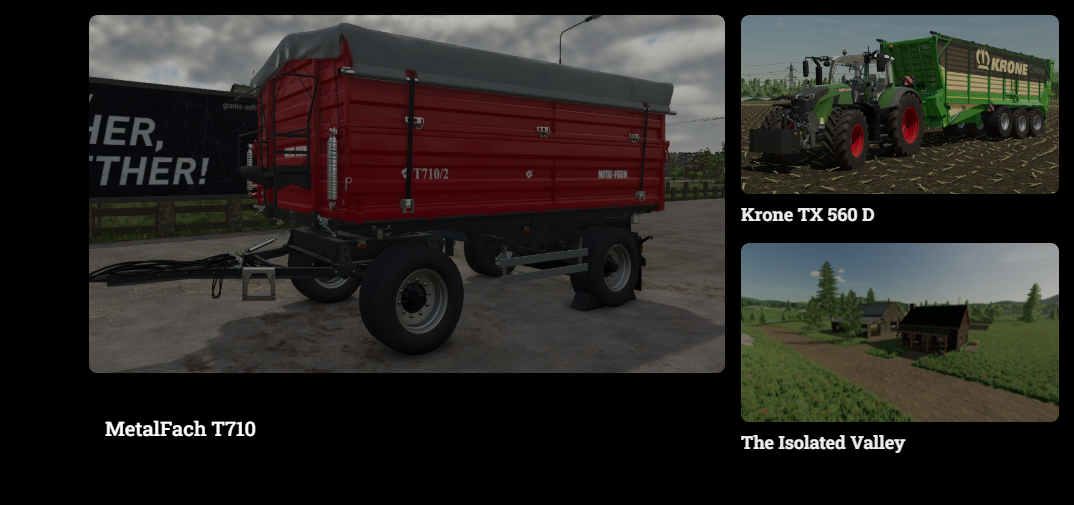
Losowe zdjecie z download na stronie głównej.
Majster87 odpowiedział(a) na Majster87 temat w Ogólny support IPS4
Tak -
Przerobiłem sobie orginalny kod: {{$radio = round( ($slider->img_h/$slider->img_w), 2 ) * 100;}} <div id="Fcontent_{$slider->id}" class="{{if $conf['fcontent_use_wrapper']}}ipsBox{{endif}}"> {{if $slider->showname == 1}} {{if $conf['fcontent_use_wrapper']}} <h3 class="ipsWidget_title ipsType_reset"> {$slider->title} </h3> {{else}} <div class="ipsPageHeader ipsClearfix sliderTitle"> <h1 class="ipsType_pageTitle">{$slider->title}</h1> </div> {{endif}} {{endif}} <div class="{{if $conf['fcontent_use_wrapper']}}ipsPadding{{endif}}"> <div id='sliderWrapper_{$slider->id}' class="sliderWrapper {{if $slider->ticker && $slider->style != 'vertical'}}fcTicker{{endif}} nolinks norewrite"> <ul class='slider_{$slider->id}' {{if $slider->style != 'horizontal'}}style='margin-left: -40px;'{{endif}} data-ipsLazyLoad> {{foreach $data as $row}} <li class="fcitem {{if $slider->title_pos == 'below'}}ipsBox{{endif}}" {{if $row['id']>0}}id="fcc_{$row['id']}"{{endif}} style='{{if $slider->ticker && $slider->margin>0}}margin-right:{$slider->margin}px;{{endif}}'> {{if $slider->nolink != 1}} {{if $slider->viewlinkin == '3' && $slider->method != 'noauto' && $slider->method != 'gallery' && $slider->method != 'nexus'}} <a href="#" data-ipsDialog data-ipsDialog-forceReload data-ipsDialog-url="{url="app=fcontent&module=slider&controller=view&do=popup&id={$slider->id}&item={$row['id']}" csrf="true"}" data-ipsDialog-size='medium' title="{$row['title']}"> {{else}} <a href="{$row['url']}" title="{$row['title']}" {{if $slider->viewlinkin == '2' || $row['newtab'] == 1}}target=_blank{{endif}}> {{endif}} {{endif}} {{if \IPS\Settings::i()->lazy_load_enabled}} <div class="fc_img_container" data-background-src="{$row['image']}" style="background-image:url('{expression="\IPS\Text\Parser::blankImage()"}'); height: 100%; max-height:{$slider->itemHeight}; width:100%; padding-bottom: {$radio}%;"></div> {{else}} <div class="fc_img_container" style="background-image:url('{$row['image']}'); height: 100%; max-height:{$slider->itemHeight}; width:100%; padding-bottom: {$radio}%;"></div> {{endif}} {{if $slider->showtitle == 1 && $row['title']}} <div class="sliderCaption {{if $slider->title_pos == 'inside'}}bx-caption{{else}}bx-caption2{{endif}}"> {{if !$slider->ticker}} <span {{if $slider->truncate > 0}}data-ipsTruncate data-ipsTruncate-type="remove" data-ipsTruncate-size="{$slider->truncate} lines"{{endif}}> {$row['title']} </span> {{else}} <span>{$row['title']}</span> {{endif}} </div> {{endif}} {{if $slider->nolink != 1}} </a> {{endif}} {{if $slider->showtitle == 1 && $row['title'] && $slider->title_pos == 'below' && $row['author']}} <div class='fcAuthor ipsType_reset ipsType_medium ipsType_light ipsType_blendLinks'> {lang="byline_nodate" htmlsprintf="$row['author']->link()"} {datetime="$row['date']"} </div> {{endif}} {{if $slider->method == 'noauto' AND ( $slider->can('manage') OR ( $row['moderators'] AND \in_array( member.member_id, explode( ",", $row['moderators'] ) ) ) )}} <div class="modbutton"> <a href='#' data-ipsdialog='' data-ipsDialog-url="{url="app=fcontent&module=slider&controller=view&do=manageslider&id={$slider->id}&item={$row['id']}"}" data-ipsdialog-size='narrow' data-ipsdialog-title='{lang="fcs_edit"}' data-ipsdialog-forcereload='true'> <i class="fa fa-pencil"></i> </a> </div> {{endif}} </li> {{endforeach}} </ul> {{if $slider->method == 'noauto' AND $slider->can('manage')}} <div class="addbutton"> <a href="{url="app=fcontent&module=slider&controller=view&id={$slider->id}"}" title='{lang="fcontent_manageslider"}'><i class="fa fa-cog"></i></a> </div> {{endif}} </div> </div> </div> {{\IPS\Output::i()->endBodyCode .= \IPS\Theme::i()->getTemplate( 'embed', 'fcontent', 'front' )->sliderConfig( $slider );}} Na taki: {{if is_array($data) && count($data) > 0}} {{$keys = array_rand($data, min(3, count($data)));}} {{$items = is_array($keys) ? array_map(function($k) use ($data) { return $data[$k]; }, $keys) : array($data[$keys]);}} {{$radio = round(($slider->img_h / $slider->img_w), 2) * 100;}} <div id="Fcontent_{$slider->id}" class="{{if $conf['fcontent_use_wrapper']}}ipsBox{{endif}}"> {{if $slider->showname == 1}} {{if $conf['fcontent_use_wrapper']}} <h3 class="ipsWidget_title ipsType_reset">{$slider->title}</h3> {{else}} <div class="ipsPageHeader ipsClearfix sliderTitle"> <h1 class="ipsType_pageTitle">{$slider->title}</h1> </div> {{endif}} {{endif}} <div class="{{if $conf['fcontent_use_wrapper']}}ipsPadding{{endif}}"> <div class="fcGridWrapper" style="display: grid; grid-template-columns: 2fr 1fr; gap: 1rem;"> {{foreach $items as $index => $row}} <div class="{{if $index == 0}}fcLargeItem{{else}}fcSmallItem{{endif}}" style="{{if $index == 0}}grid-row: span 2;{{endif}}"> <a href="{$row['url']}" {{if $slider->viewlinkin == '2' || $row['newtab'] == 1}}target="_blank"{{endif}}> <div style="background-image: url('{$row['image']}'); background-size: cover; background-position: center; aspect-ratio: 16/9; border-radius: 8px;"></div> <h3 class="ipsType_sectionHead" style="margin-top: 0.5rem;">{$row['title']}</h3> </a> </div> {{endforeach}} </div> </div> </div> {{else}} <p>Brak plików do wyświetlenia.</p> {{endif}} I daje jeden duży po prawej i dwa po lewej Ale po odswiezeniu strony sa te same, dopiero po jakims czasie sie zmieniaja 😕 Ładowane sa z Cache z tego co kojarzę, jest możliwość ominięcia cache żeby co odświeżenie się zmieniały? Dodałem na poczatku kodu cos takiego {{\IPS\Output::i()->pageCaching = FALSE;}} ale nic to nie daje.
-
Grid pomógł 👍
-
zapomniałem o nim xD
-
Probóje dodac pokaz plikow na strone główna zeby było w 3 kolumnach uzyłem kodu i to duzo z ChatGPT ale dostaje rezultal w jednej kolumnie 😕 Kod taki: <style> .mod-container { column-count: 2; column-gap: 20px; padding: 20px; } .mod-card { background-color: #f9f9f9; border: 1px solid #ddd; border-radius: 8px; overflow: hidden; text-align: center; margin-bottom: 20px; break-inside: avoid-column; box-shadow: 0 2px 5px rgba(0,0,0,0.1); transition: transform 0.2s ease, box-shadow 0.2s ease; } .mod-card:hover { transform: translateY(-5px); box-shadow: 0 4px 10px rgba(0,0,0,0.15); } .mod-card img { width: 100%; height: auto; object-fit: cover; } .mod-card h4 { margin: 10px 0 5px; font-size: 1.1em; } .mod-card p { margin: 0 0 10px; color: #555; font-size: 0.9em; } .mod-button { display: inline-block; margin-bottom: 10px; padding: 8px 12px; background-color: #007bff; color: #fff; text-decoration: none; border-radius: 4px; font-size: 0.9em; } .mod-button:hover { background-color: #0056b3; } </style> <div class="mod-container"> <div class="mod-card"> <img src="https://example.com/mod1.jpg" alt="Mod 1"> <h4>⭐ Super Mod 1</h4> <p>Autor: ModMaster</p> <a href="#" class="mod-button">Więcej informacji</a> </div> <!-- IPS wygeneruje więcej kart automatycznie --> </div> jak uzyskać to w 2 kolumnach?
-
Jak dodać do zaktualizowanych plików żeby tez po 24 czy tam 48 godzinach znikał napis/ikonka jak przy nowych? <div class="image-section" style="position: relative;"> {{if $file->submitted != $file->updated}} <img src="img/up.png" alt="Up" style="position: absolute; top: -47px; right: -12px; width: 157px; height: auto; z-index: 10;"> {{endif}} {{if $file->submitted > \IPS\DateTime::create()->sub( new \DateInterval( 'PT24H' ) )->getTimestamp() }} <img src="img/new.png" alt="New" style="position: absolute; top: 6px; right: 2px; width: 100px; height: auto; z-index: 10;"> {{endif}} probowałem skopiowac fragment > \IPS\DateTime::create()->sub( new \DateInterval( 'PT24H' ) )->getTimestamp() i wstawic za tym != $file->updated to ikonka z zaktualizowanych znikła ale była na innych które nie zostały zaktualizowane w ogóle
-
Bez zmian, nie zwijało tekstu w ogóle.
-
ok poradziłem sobie, uzyskałem to tym kodem: <div id="descContainer"> <div id="descContent"> {$file->content()|raw} </div> <a href="#" id="toggleBtn" style="display:inline-block; margin-top:10px; font-weight:bold;">[Rozwiń]</a> </div> {{if $file->editLine()}} {$file->editLine()|raw} {{endif}} <script> document.addEventListener("DOMContentLoaded", function () { const content = document.getElementById("descContent"); const toggleBtn = document.getElementById("toggleBtn"); const maxLines = 5; const lineHeight = 24; const fullHeight = content.scrollHeight; const maxHeight = maxLines * lineHeight; if (fullHeight <= maxHeight) { toggleBtn.style.display = "none"; return; } content.style.maxHeight = maxHeight + "px"; content.style.overflow = "hidden"; let expanded = false; toggleBtn.addEventListener("click", function (e) { e.preventDefault(); expanded = !expanded; content.style.maxHeight = expanded ? fullHeight + "px" : maxHeight + "px"; toggleBtn.textContent = expanded ? "[Zwiń]" : "[Rozwiń]"; }); }); </script>
-
Próbuje zwinac tekst w opisie i edytowałem orginalny fragment na cos takiego <div class='ipsType_richText ipsContained ipsType_break ipsSpacer_bottom' data-controller='core.front.core.lightboxedImages core.front.core.truncate' data-truncate-size='5' data-truncate-type='lines' data-truncate-more='[Rozwiń]' data-truncate-less='[Zwiń]'> {$file->content()|raw} </div> {{if $file->editLine()}} {$file->editLine()|raw} {{endif}} ale nie zwija tekstu 😕
-
Przejrzyj wszystko wcześniej, masz tam wszystko
-
Na początku podał bys adres forum w temacie albo w profilu uzupełnił
-
Nie które style maja już to dodane w css przez autorów, musisz poszukać tego w stylu i edytować pod siebie.
-
wszystko masz podane nawet na zrzucie co ci podesłałem 😐 :root { --highlighted_color_1: 000, 142, 195; --highlighted_color_2: 032, 137, 000; --highlighted_color_3: 102, 000, 000; } body[data-pagemodule="messaging"][data-pagecontroller="messenger"] .ipsComment_highlighted:not(.ipsBox_transparent):not(.ipsModerated):not(.ipsComment_selected):not(.ipsComment_popular ) { box-shadow: 0px 0px 0px 1px rgba( var(--theme-text_light), 0.2 ), var(--box--boxShadow); } [data-membergroup="4"].ipsComment_highlighted { --ipsComment_highlighted--boxShadow: 0px 0px 0px 1px rgba( var(--highlighted_color_3), 0.6 ), 0px 0px 0px 5px rgba( var(--highlighted_color_3), 0.15 ); } [data-membergroup="6"].ipsComment_highlighted { --ipsComment_highlighted--boxShadow: 0px 0px 0px 1px rgba( var(--highlighted_color_1), 0.6 ), 0px 0px 0px 5px rgba( var(--highlighted_color_1), 0.15 ); } [data-membergroup="7"].ipsComment_highlighted { --ipsComment_highlighted--boxShadow: 0px 0px 0px 1px rgba( var(--highlighted_color_2), 0.6 ), 0px 0px 0px 5px rgba( var(--highlighted_color_2), 0.15 ); }
-
temat działa, ta sie dzieje jak sie nie ma w profilu client, jeśli posiadasz licencje pisz do supportu o nadanie rangi która jest automatycznie nadawana przy zakupie do konta. Ale wyżej DawPi podał ci tekst zacytowany z tego tematu do rozwiązania twojego problemu.
-
Error: Call to a member function url() on null in /var/www/u233951/data/www/fs-portal.pl/system/Theme/Theme.php(885) : eval()'d code:3539 Stack trace: #0 /var/www/u233951/data/www/fs-portal.pl/system/Theme/SandboxedTemplate.php(61): IPS\Theme\class_downloads_front_view->view() #1 /var/www/u233951/data/www/fs-portal.pl/applications/downloads/modules/front/downloads/view.php(266): IPS\Theme\_SandboxedTemplate->__call() #2 /var/www/u233951/data/www/fs-portal.pl/system/Dispatcher/Controller.php(118): IPS\downloads\modules\front\downloads\_view->manage() #3 /var/www/u233951/data/www/fs-portal.pl/system/Content/Controller.php(50): IPS\Dispatcher\_Controller->execute() #4 /var/www/u233951/data/www/fs-portal.pl/applications/downloads/modules/front/downloads/view.php(62): IPS\Content\_Controller->execute() #5 /var/www/u233951/data/www/fs-portal.pl/system/Dispatcher/Dispatcher.php(153): IPS\downloads\modules\front\downloads\_view->execute() #6 /var/www/u233951/data/www/fs-portal.pl/index.php(13): IPS\_Dispatcher->run() #7 {main} takie cos w logach pokazuje nie wiem czy to to było ale w tym kodzie {{if ( \IPS\Member::loggedIn()->member_id == $file->author()->member_id OR $file->canUnhide() OR $file->canHide() ) AND $file->hasPendingVersion()}} <div class="ipsMessage ipsMessage_warning ipsSpacer_both ipsClearfix"> <p class="ipsType_reset"> {lang="file_pending_approval_version"} <ul class='ipsList_inline ipsPos_right' data-controller="downloads.front.pending.buttons"> {{if $file->canUnhide() OR $file->canHide()}} <li> <a href="{expression="\IPS\downloads\File\PendingVersion::load($file->id, 'pending_file_id')->url()"}" class="ipsPos_right ipsButton ipsButton_positive ipsButton_verySmall sm:ipsMargin_top:half sm:ipsPos_left" title='{lang="file_pending_version_button"}'>{lang="file_pending_version_button"}</a> </li> {{endif}} {{if $file->canDeletePendingVersion() }} <li> <a href="{expression="\IPS\downloads\File\PendingVersion::load($file->id, 'pending_file_id')->url()->setQueryString('do','delete')->csrf()"}" class="ipsPos_right ipsButton ipsButton_negative ipsButton_verySmall sm:ipsMargin_top:half sm:ipsPos_left" title='{lang="delete"}' data-confirm>{lang="delete"}</a> </li> {{endif}} </ul> </div> {{endif}} miałem zamkniecie <p w ten sposób {{if ( \IPS\Member::loggedIn()->member_id == $file->author()->member_id OR $file->canUnhide() OR $file->canHide() ) AND $file->hasPendingVersion()}} <div class="ipsMessage ipsMessage_warning ipsSpacer_both ipsClearfix"> <p class="ipsType_reset"> {lang="file_pending_approval_version"} <ul class='ipsList_inline ipsPos_right' data-controller="downloads.front.pending.buttons"> {{if $file->canUnhide() OR $file->canHide()}} <li> <a href="{expression="\IPS\downloads\File\PendingVersion::load($file->id, 'pending_file_id')->url()"}" class="ipsPos_right ipsButton ipsButton_positive ipsButton_verySmall sm:ipsMargin_top:half sm:ipsPos_left" title='{lang="file_pending_version_button"}'>{lang="file_pending_version_button"}</a> </li> {{endif}} {{if $file->canDeletePendingVersion() }} <li> <a href="{expression="\IPS\downloads\File\PendingVersion::load($file->id, 'pending_file_id')->url()->setQueryString('do','delete')->csrf()"}" class="ipsPos_right ipsButton ipsButton_negative ipsButton_verySmall sm:ipsMargin_top:half sm:ipsPos_left" title='{lang="delete"}' data-confirm>{lang="delete"}</a> </li> {{endif}} </ul> </p> </div> {{endif}} i było na czerwono i na samym końcu strony </div> tez na czerwono, usunąłem to </p> i wszystko na zielono teraz, możliwe ze to by robiło ten problem?
-
Dostaje jakiś dziwny błąd przy wejściu do pliku do zatwierdzenia w innych wszystko działa: [[Template downloads/front/view/view is throwing an error. This theme may be out of date. Run the support tool in the AdminCP to restore the default theme.]] Jak to można naprawic? Dodam ze nie zawsze co jakis czas tak sie dzieje
-
Dodawanie bloków w niestandardowych miejscach
Majster87 odpowiedział(a) na Angle temat w Ogólny support IPS4
no spoko tylko pod wersja 4.7 jak cos dodajesz i odświeżasz to znika blok 😛 nawet na stylu oryginalnym. -
Widok dodanych zdjęć w temacie plików.
Majster87 odpowiedział(a) na Majster87 temat w Ogólny support IPS4
Temat można zamknąć poradziłem sobie z tym. w ten sposób uzyskałem duży podgląd i przez css ukrycie dodatkowych co się pod spodem wyświetlały {{foreach $file->screenshots(1) as $id => $screenshot}} <img src="{$screenshot->url}" alt="Main Preview" class="preview-image"> {{endforeach}}






- Poprzednia
- 1
- 2
- 3
- 4
- 5
- 6
- 7
- Dalej
- Strona 2 z 25