

YGEX
-
Postów
13 -
Dołączył
-
Ostatnia wizyta
-
Wygrane w rankingu
2




Osiągnięcia YGEX



-
yes, indeed the name might seem unfit with the content, was just something that seemed ok at the time i started. the reason why they are all in one, since the plugins are gone, i preffer to have an organized space without to many things, keeping them togheter reduce the numbers of apps inside acp.
-
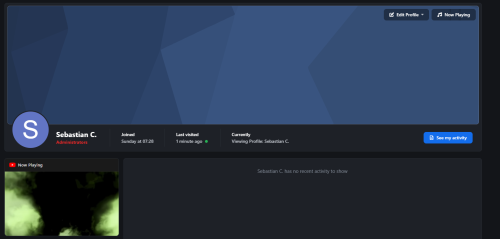
Community Essentials View File Community Essentials Essential tools and enhancements to customize and improve your community experience. Community Essentials is an application for Invision Community 5 that bundles multiple features into a single, lightweight package. Every feature has its own settings page in the AdminCP and works out of the box — no core file edits, no complicated setup. Group Legend A color-coded legend of your member groups, displayed as a sidebar widget. Admins pick which groups to show and drag them into the desired display order. Each group appears with its formatted name and color styling. Clicking a group name takes visitors to a member search filtered by that group. Choose which groups appear in the legend Drag-and-drop reordering Sidebar widget with static caching for performance Steam Group Display your Steam community group's live information in a beautiful sidebar widget. Enter your Steam group's custom URL name or numeric ID, and the widget pulls live data from Steam's public feed. Toggle exactly which info to show and pick from four visual themes. Four themes included: Steam (classic dark blue gradients and teal accents), Modern (clean light design with purple accents), Pulse (cyberpunk HUD style with terminal-style stat readouts and scan line animations), and Aurora (hero banner with animated gradient background, orbiting avatar ring, and shimmer text). Configurable elements you can toggle on/off: Group Name, Group Avatar, Total Members, Members Online, Members In Game, Members In Chat, Join Group Button. Now Playing Let members showcase what they're listening to or watching directly on their profile page. Members paste a YouTube or Spotify link on a dedicated settings page. When someone visits their profile, they see an embedded player with a branded header (platform icon + "Now Playing" label). An optional autoplay toggle lets the music start automatically. Supports YouTube (videos, shorts, music, embeds) and Spotify (tracks, albums, playlists, episodes). For members: dedicated settings page, autoplay toggle, "Now Playing" button in the profile header for quick access, and a "Set Now Playing" prompt on their own profile when no URL is set (invisible to others). For admins: set a default URL that shows on profiles of members who haven't picked their own, control which member groups can use the feature, and add it to the site's main navigation menu. Spotify embeds automatically adjust their height — compact for single tracks, taller for albums and playlists. Submitter YGEX Submitted 09/15/2026 Category Mods Supported Version 5.0.19
-
Wersja 1.0.5
10 pobrań
Community Essentials Essential tools and enhancements to customize and improve your community experience. Community Essentials is an application for Invision Community 5 that bundles multiple features into a single, lightweight package. Every feature has its own settings page in the AdminCP and works out of the box — no core file edits, no complicated setup. Group Legend A color-coded legend of your member groups, displayed as a sidebar widget. Admins pick which groups to show and drag them into the desired display order. Each group appears with its formatted name and color styling. Clicking a group name takes visitors to a member search filtered by that group. Choose which groups appear in the legend Drag-and-drop reordering Sidebar widget with static caching for performance Steam Group Display your Steam community group's live information in a beautiful sidebar widget. Enter your Steam group's custom URL name or numeric ID, and the widget pulls live data from Steam's public feed. Toggle exactly which info to show and pick from four visual themes. Four themes included: Steam (classic dark blue gradients and teal accents), Modern (clean light design with purple accents), Pulse (cyberpunk HUD style with terminal-style stat readouts and scan line animations), and Aurora (hero banner with animated gradient background, orbiting avatar ring, and shimmer text). Configurable elements you can toggle on/off: Group Name, Group Avatar, Total Members, Members Online, Members In Game, Members In Chat, Join Group Button. Now Playing Let members showcase what they're listening to or watching directly on their profile page. Members paste a YouTube or Spotify link on a dedicated settings page. When someone visits their profile, they see an embedded player with a branded header (platform icon + "Now Playing" label). An optional autoplay toggle lets the music start automatically. Supports YouTube (videos, shorts, music, embeds) and Spotify (tracks, albums, playlists, episodes). For members: dedicated settings page, autoplay toggle, "Now Playing" button in the profile header for quick access, and a "Set Now Playing" prompt on their own profile when no URL is set (invisible to others). For admins: set a default URL that shows on profiles of members who haven't picked their own, control which member groups can use the feature, and add it to the site's main navigation menu. Spotify embeds automatically adjust their height — compact for single tracks, taller for albums and playlists.Darmowy -
I wanna make the secondary nav links be like a drop down view and not the inline default sort.
-
I`m in a bit of a problem, i don't exactly where to look to change the aspect of secondary nav... to
-
I've made it...but is not working properly, it`s display only in days. I used the "if" and "elseif" to create the code but only the first part works... <div class="ipsType_center regTime" data-ipstooltip="" _title="Time Since User Registration" style=""> {{if $date_joined = floor((strtotime("now")-strtotime("{$comment->author()->joined}"))/86400)}} <li class="regTimeformat">{$date_joined} DAYS OF REGISTRATION</li> {{elseif $date_joined = floor((strtotime("now")-strtotime("{$comment->author()->joined}"))/2592000)}} <li class="regTimeformat">{$date_joined} MONTHS OF REGISTRATION</li> {{elseif $date_joined = floor((strtotime("now")-strtotime("{$comment->author()->joined}"))/31536000)}} <li class="regTimeformat">{$date_joined} YEARS OF REGISTRATION</li> {{endif}} </div> EDIT : I see now that i arranged the code in a wrong way, switched days with years and now works properly.
-
More like how many days / months / years passed by since he`is registered.
-
Hello, i want to add this two type of badges into my postContainer. The "staff member" badge i figured out with a method, using the "{{if $comment->author()->modShowBadge()}}" code but for the time since member registred i don`t know what code to use. So far this is what i've made : Also, do you have any recommendation of what to use instead the code i`ve used for the staff one, i wanted to be automatic instead of adding the groups id.
-
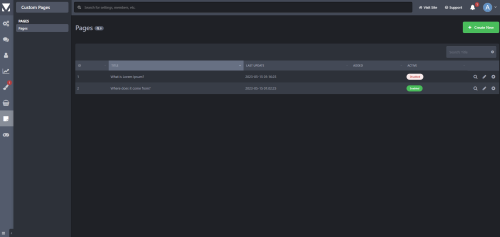 If you don't want to use pages or is just too complicated to work just for a few info pages this app will do the job just perfect. I recommend using it.
 -
A few tips about creating a plugin ?
YGEX odpowiedział(a) na YGEX temat w Programowanie / tworzenie styli
So, for example i have this code to display the stats of our teamspeak 3 server ( i said for example because i don`t have just one code, this one was the quickest got into my mind ) : Normally i would add the code via template putting in it inside core-global-sidebar after this line : <div data-role='sidebarAd'> {advertisement="ad_sidebar"} </div> After that i`ll be forced to create an empty announce from the ACP to display my code from the template. I'll do the same steps to display our steam groups, other servers or images ( right know i installed an app to display things as widgest extern the template ). I looked over the IPS tutorial and i saw the template hook method were you add things inside the template via plugins but will be the same as i do without a plugin versions of it. I want to make it as a widget that you can move and drag from widget menu but this is the part where i get confused because i don`t know how to start. -
A few tips about creating a plugin ?
YGEX odpowiedział(a) na YGEX temat w Programowanie / tworzenie styli
Hello, yes but not on a perfect level, somewhere around medium level just to keep me `safe` when i wanna do some edits over a script or implement it. -
Hello, thanks in advance for everyone who will gonna read my topic and will want to help me. I want to create a few plugins for my community ( basically i want to transform into a plugin what i add now in sidebar via theme template ) but the tutorial that is available on IPS is a bit vague and i don`t really understand it. I don't understand where to add my code into developer mod plugin center so it will be displayed as a sidebar plugin ( hook ). I would be really grateful if you will share a few tips and advices with me. Thanks again for your time.
-
Hello Split, i have one question about the app, is there any way to change the URL where the page is created ? So instead of the ID to be the title of the page ?