DawPi
-
Postów
78 230 -
Dołączył
-
Ostatnia wizyta
-
Wygrane w rankingu
587
Typ zawartości
Profile
Forum
Pliki
Galeria
Blogi
Sklep
Wydarzenia
Treść opublikowana przez DawPi
-

Widok dodanych zdjęć w temacie plików.
DawPi odpowiedział(a) na Majster87 temat w Ogólny support IPS4
Lefty i Righty jak mniemam. -
Widok dodanych zdjęć w temacie plików.
DawPi odpowiedział(a) na Majster87 temat w Ogólny support IPS4
Nawet sam to podałeś w jednym z poprzednich postów: <div class='ipsCarousel ipsClearfix' data-ipsCarousel data-ipsCarousel-showDots> <div class='ipsCarousel_inner'> <ul class='cDownloadsCarousel ipsClearfix' data-role="carouselItems"> {{$fullScreenshots = iterator_to_array( $file->screenshots() );}} {{foreach $file->screenshots( 1 ) as $id => $screenshot}} <li class='ipsCarousel_item' data-ipsLazyLoad> <span {{if settings.lazy_load_enabled}}data-background-src='{backgroundimage="$screenshot->url"}'{{else}}style='background-image: url({backgroundimage="$screenshot->url"})'{{endif}} class="ipsThumb ipsThumb_medium ipsThumb_bg ipsCursor_pointer" data-ipsLightbox data-ipsLightbox-group="download_{$file->id}" data-fullURL="{$fullScreenshots[ $id ]->url}"> <img {{if settings.lazy_load_enabled}}src='{expression="\IPS\Text\Parser::blankImage()"}' data-{{endif}}src="{$screenshot->url}" alt=""> </span> </li> {{endforeach}} </ul> </div> <span class='ipsCarousel_shadow ipsCarousel_shadowLeft'></span> <span class='ipsCarousel_shadow ipsCarousel_shadowRight'></span> <a href='#' class='ipsCarousel_nav ipsHide' data-action='prev'><i class='fa fa-chevron-left'></i></a> <a href='#' class='ipsCarousel_nav ipsHide' data-action='next'><i class='fa fa-chevron-right'></i></a> </div> -
Ale to tyczy się samych plików w Downloads prawda? Bo napisałeś w tytule wątku „tematów”.
-
Oceny czyli? Gwiazdki?
-
Pytanie odnośnie rozmiaru bazy danych i opcji archiwizacji starych postów
DawPi odpowiedział(a) na aster temat w Rozmowy o IPS Community
Tak, jest:
-
Czy jest dostępny importer z UBB.threads?
DawPi odpowiedział(a) na aster temat w Rozmowy o IPS Community
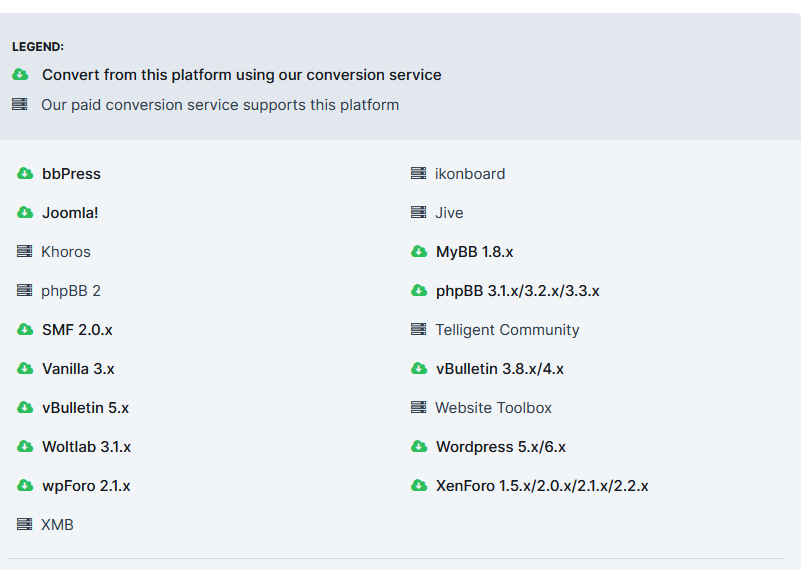
Na liście - https://invisioncommunity.com/services/convert/ Nie widzę: Jakbyś koniecznie potrzebował to mogę Ci taki konwerter napisać. Nie.
-
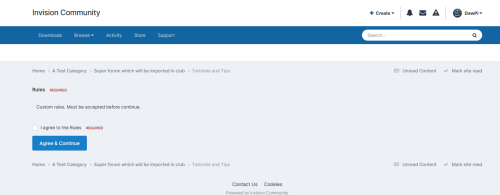
(DP47) Accept Rules Before Enter Forum Zobacz plik English: Polski: Dodający DawPi Dodano 28.08.2024 Kategoria Płatne modyfikacje 4 Wspierana wersja 4.7.x+
-
Wersja 1.0.0
0 pobrań
This modification for IPS4 forums enforces a rule where users must accept the specific terms and conditions of a forum section before they are allowed to view its content. This feature is particularly useful for sections with age restrictions (such as 18+) or other specialized content. Key features: Mandatory Rule Acceptance: Users must read and accept the forum rules specific to a section before accessing any content within it. Content Hiding: The modification hides all content from users who have not accepted the rules, preventing them from previewing or accessing any posts or threads. Enhanced Compliance: Ensures that users are aware of and agree to the terms before engaging with potentially sensitive or restricted content. This modification is ideal for forums that need to enforce compliance with specific guidelines or regulations, ensuring that users acknowledge and agree to rules before they can view any content. - - - Ta modyfikacja do forum IPS4 wymusza na użytkownikach akceptację określonych warunków i regulaminu danego działu przed umożliwieniem im przeglądania jego zawartości. Funkcjonalność ta jest szczególnie przydatna dla działów z ograniczeniami wiekowymi (np. 18+) lub innych specjalistycznych treści. Główne cechy: Obowiązkowa Akceptacja Regulaminu: Użytkownicy muszą zapoznać się z regulaminem i zaakceptować go, zanim uzyskają dostęp do jakiejkolwiek zawartości w danym dziale. Ukrywanie Treści: Modyfikacja ukrywa całkowicie zawartość przed użytkownikami, którzy nie zaakceptowali regulaminu, uniemożliwiając im podglądanie lub przeglądanie postów i wątków. Zwiększona Zgodność: Zapewnia, że użytkownicy są świadomi i zgadzają się na warunki przed przystąpieniem do przeglądania potencjalnie wrażliwych lub ograniczonych treści. Ta modyfikacja jest idealna dla forów, które muszą egzekwować przestrzeganie określonych wytycznych lub przepisów, zapewniając, że użytkownicy zaakceptują zasady przed uzyskaniem dostępu do zawartości.150 zł -
(DP47) Dots in E-mail Ban Checker Zobacz plik English: Polski: Dodający DawPi Dodano 28.08.2024 Kategoria Płatne modyfikacje 4 Wspierana wersja 4.7.x+
-

Wersja 1.0.0
0 pobrań
This mod alters the behavior of the built-in email filtering system in IPS4 to ensure that variations of email addresses which are visually similar but differ in minor details (such as dots in Gmail addresses) are treated equivalently. For instance, the addresses [email protected] and [email protected] will be considered the same under our filter system. This approach effectively prevents users from bypassing email bans or filters by manipulating the format of their email addresses. Key features: Uniform Handling: Regardless of how dots or similar variations are used, the email addresses are normalized to ensure consistent treatment. Effective Filtering: Prevents evasion of email bans by recognizing different forms of the same email address. Enhanced Security: Maintains the integrity of email filtering and ban mechanisms by eliminating opportunities for manipulation. This mechanism is ideal for businesses and platforms that need to enforce email bans or restrictions reliably. --- Modyfikacja zmienia nieznacznie działanie wbudowanego mechanizmu filtrów banów na e-maile. Jest zaprojektowana tak, aby różne warianty adresów e-mail, które są wizualnie podobne, ale różnią się drobnymi szczegółami (takimi jak kropki w adresach Gmail), były traktowane jednakowo. Na przykład, adresy [email protected] i [email protected] będą uznawane za ten sam adres w systemie filtrów banów na e-mail. Takie podejście skutecznie zapobiega omijaniu banów lub filtrów e-mailowych poprzez manipulację formatem adresu e-mail. Główne cechy: Jednolite Przetwarzanie: Bez względu na użycie kropek lub podobnych wariantów, adresy e-mail są normalizowane, aby zapewnić spójną obsługę. Skuteczne Filtrowanie: Zapobiega omijaniu banów e-mailowych przez rozpoznawanie różnych form tego samego adresu e-mail. Zwiększone Bezpieczeństwo: Utrzymuje integralność mechanizmów filtrów i banów e-mailowych, eliminując możliwości manipulacji. Ten mechanizm jest idealny dla firm i platform, które muszą skutecznie egzekwować bany lub ograniczenia e-mailowe.100 zł -
No normalnie, mając IP usera blokujesz go tutaj: ACP Użytkownicy Ustawienia użytkowników Blokady Dodaj nowy filtr blokady
-
No dużego wyboru nie masz.
-
I jak?
-
Powiadomienie po rejestracji nowego użytkownika
DawPi odpowiedział(a) na adiyoshi temat w Ogólny support IPS4
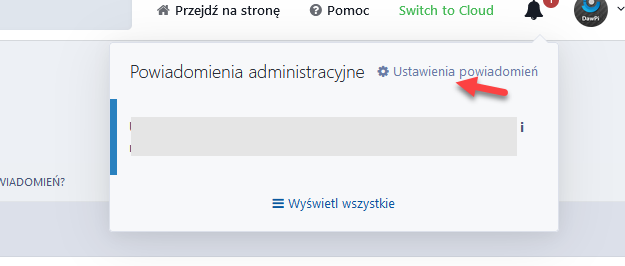
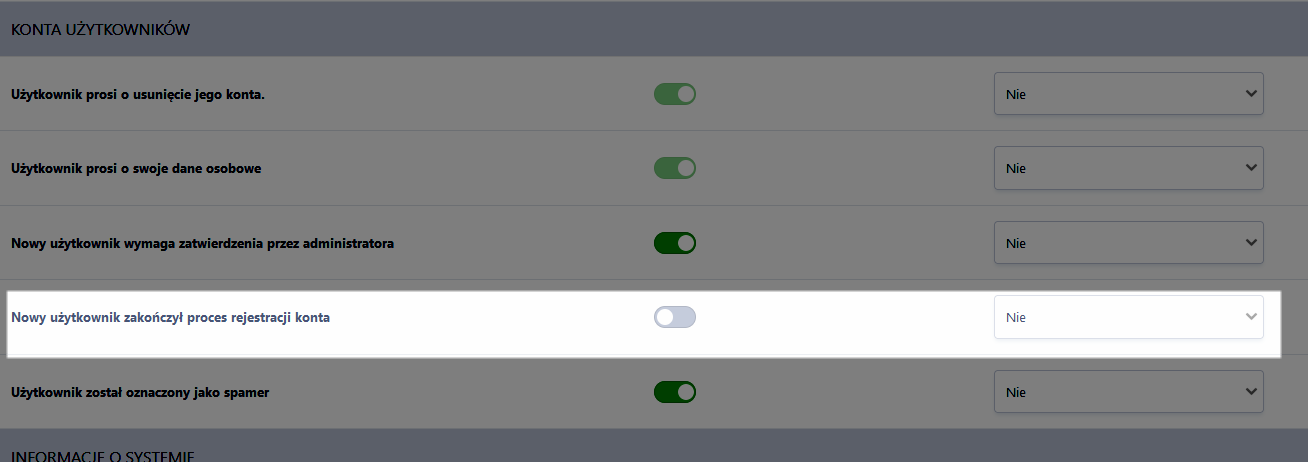
Jest tak jak myślałem, to było w 4: /** * Send email to admin telling them the user has registered * If no validation, or admin-only validation is enabled: this is called immediately after registration * If email-only or email-and-admin validation is enabled: this is called after the user has validated their email address * i.e. in all cases, it is when the admin needs to approve the account, or, if no admin validation is enabled, when the account is ready to use * * @return void */ protected function _registrationNotifyAdmin() { if( \IPS\Settings::i()->new_reg_notify ) { //.... \IPS\Email::buildFromTemplate( 'core', 'registration_notify', array( $this, $profileFields ), \IPS\Email::TYPE_LIST )->send( \IPS\Settings::i()->email_in ); } } Potem było to przeniesione do powiadomień dla admina podczas jednej z aktualizacji: foreach ( array( 'new_reg_notify' => 'core_NewRegComplete', 'spm_notify' => 'core_Spammer', 'error_notify_level' => 'core_Error' ) as $settingKey => $notificationKey ) { if ( \IPS\Settings::i()->$settingKey ) { $member = \IPS\Member::load( \IPS\Settings::i()->email_in, 'email' ); if ( $member->member_id ) { \IPS\Db::i()->insert( 'core_acp_notifications_preferences', array( 'member' => $member->member_id, 'type' => $notificationKey, 'view' => 1, 'email' => 'always' ) ); } } } I.... mamy to! Finalnie wylądowało tutaj: https://twojeforum/admin/?app=core&module=overview&controller=notifications&do=settings Czyli w ACP w ustawieniach powiadomień: A dokładniej:
-
Powiadomienie po rejestracji nowego użytkownika
DawPi odpowiedział(a) na adiyoshi temat w Ogólny support IPS4
To jest trochę chyba źle ujęte, bo to nie powiadamia admina tylko wysyła jakby od admina, a jest używane w przypadku dodawania usera w ACP i tej opcji: Lub przy dodawaniu usera poprzez APi. To może być to. Sprawdzę dokładniej i dam znać.
-
Zobacz to - https://www.sosinvision.com.br/index.php?/file/298-community-map/
-
Sugerowana poprawka została przyjęta przez członka grupy tłumaczy. Dziękujemy.
-
Informacje zbiorcze o tym co nadchodzi w relatywnie najbliższym czasie
DawPi odpowiedział(a) na DawPi temat w Informacje i ogłoszenia
199$ za rok wszystkich aplikacji jak się używa powiedzmy 3/4 z nich to wcale nie taki zły deal. -
Powiadomienie po rejestracji nowego użytkownika
DawPi odpowiedział(a) na adiyoshi temat w Ogólny support IPS4
Hej, teraz tak patrzyłem na szybko to ja takiej opcji wbudowanej nie kojarzę. Jeszcze popatrzę jutro, ale chyba bez modyfikacji się nie obejdzie. -
New version with support for Cyrillic language released. 👍
-
Like this? Effect:
-
I do not using that language at all. I may try check it, but copy paste here that post content for tests. I can't rewrite it by myself.
-
Widok dodanych zdjęć w temacie plików.
DawPi odpowiedział(a) na Majster87 temat w Ogólny support IPS4
Jaka data? Nie rozumiem. -
There is nothing to fix. I can give you a manual for one file edit to change it to match exact phrases. Do you want it?
-
Widok dodanych zdjęć w temacie plików.
DawPi odpowiedział(a) na Majster87 temat w Ogólny support IPS4
To już musisz grzebać. Chciałeś miniatury to masz.